
Top dollar – Instant quotes
Sell your custom desktop PC online
Sell your custom desktop PC online with Canitcash for a fast quote, free shipping, and quick payout.
How it works
Our 4-step hassle free process
Get Your Instant Quote
Tell us about your custom desktop PC to get a free, instant, no-obligation quote.
Ship it for Free
We’ll send you a prepaid shipping label—simply pack your custom desktop PC and ship it at no cost to you.
Inspection
Our team performs a fast, transparent inspection to confirm your custom desktop PC’s hardware and condition, and we’ll notify you as soon as it’s complete.
Get Paid Fast
Once you accept the offer, we’ll send payment for your custom desktop PC within 24 hours using your preferred method.
Identify your custom PC components
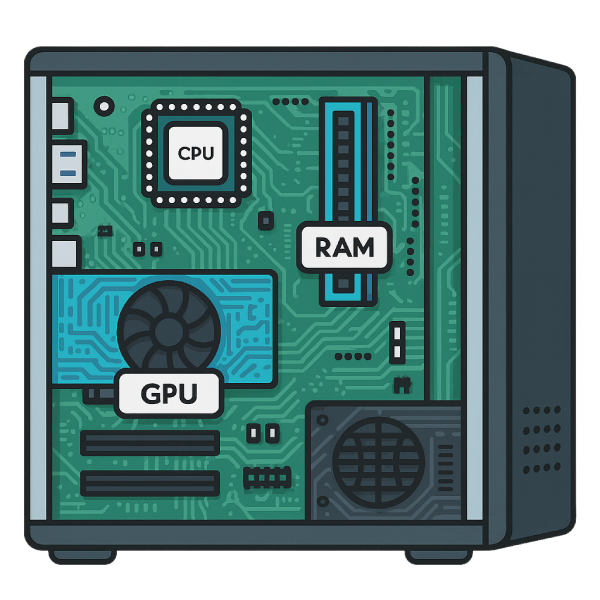
Before getting a quote for your custom desktop, it helps to know what’s inside your system. The main parts that determine value are the CPU, GPU, RAM, and storage drive. Here’s how to quickly find each one.
1. Locate your CPU (Processor):
Right-click the Windows Start button and select “System.” In the window that opens, look for “Processor.” This shows the exact CPU model and generation, for example Intel Core i7-12700 or AMD Ryzen 5 5600.
2. Locate your GPU (Graphics Card):
Right-click the Windows Start button and select “Device Manager.” In the list, expand “Display adapters.” The name shown here is your graphics card, such as NVIDIA GeForce RTX 4070 or AMD Radeon RX 6700 XT.
3. Locate your RAM (Memory):
In the same “System” window used to find your CPU, look for “Installed RAM.” You’ll see the total amount of memory in your system, for example 16 GB. To check whether it’s DDR3, DDR4, or DDR5, you can use a free tool like CPU-Z.
4. Locate your storage drive (HDD or SSD):
Right-click the Windows Start button and select “Disk Management.” This window shows all drives connected to your PC, including their size and partitions.
To check whether a drive is a hard disk drive (HDD) or solid-state drive (SSD), open Task Manager, click the Performance tab, and select each drive on the left. The drive type will be shown there.

Frequently Asked Questions
Selling Your Custom Desktop PC
How do I find out what’s inside my custom desktop PC?
Right-click the Windows Start button and open “System,” “Device Manager,” and “Disk Management.” These show your CPU, GPU, RAM, and storage details. You can also use a free program like CPU-Z to check your RAM type (DDR3, DDR4, or DDR5).
Can I sell my custom desktop PC if it has mixed parts?
Yes. We accept custom desktops with different brands or generations of components. During inspection, our team confirms your system’s exact hardware so your quote accurately reflects its specs.
Do I need to include the monitor, keyboard, or mouse?
No. We only require the desktop tower and power cord. Accessories and peripherals aren’t necessary and don’t affect your quote.
What if I don’t agree with the final offer?
If you choose not to proceed after inspection, we’ll return your custom desktop PC to you at no cost.
How long does it take to get paid?
Once you approve your offer, payment is issued within 24 hours using your selected method.
Can I sell my custom gaming PC?
Yes. We purchase custom gaming PCs and desktops with any combination of components. During inspection, we verify your hardware — including your graphics card, processor, and memory — to make sure your quote reflects your system’s true value.
Do you buy broken or not working custom desktop PCs?
Yes. We purchase custom desktop PCs even if they’re not fully working. Our team will test each component — such as the GPU, CPU, and RAM — to verify what’s functional and make an updated offer based on the parts that pass inspection.
Right-click the Windows Start button and open “System,” “Device Manager,” and “Disk Management.” These show your CPU, GPU, RAM, and storage details. You can also use a free program like CPU-Z to check your RAM type (DDR3, DDR4, or DDR5).
Yes. We accept custom desktops with different brands or generations of components. During inspection, our team confirms your system’s exact hardware so your quote accurately reflects its specs.
No. We only require the desktop tower and power cord. Accessories and peripherals aren’t necessary and don’t affect your quote.
If you choose not to proceed after inspection, we’ll return your custom desktop PC to you at no cost.
Once you approve your offer, payment is issued within 24 hours using your selected method.
Yes. We purchase custom gaming PCs and desktops with any combination of components. During inspection, we verify your hardware — including your graphics card, processor, and memory — to make sure your quote reflects your system’s true value.
Yes. We purchase custom desktop PCs even if they’re not fully working. Our team will test each component — such as the GPU, CPU, and RAM — to verify what’s functional and make an updated offer based on the parts that pass inspection.
Ready to sell your custom desktop PC?
At Canitcash, we’re committed to transparency, security, and customer satisfaction. With no-obligation quotes and a completely risk-free process, there’s no reason to wait. Get started today and see how fast and easy it is to sell your custom desktop PC online.